

Description
Fast AWS Role Switching for Developers
Overview
The AWS Role Switcher plugin is designed to streamline role management for developers working across multiple AWS accounts and environments. It addresses a common pain point in cloud development workflows: the need to frequently switch between different IAM roles within the AWS Management Console. With a limit of only five roles visible in the standard console, users managing numerous roles often face inefficiencies and workflow disruptions. This browser extension provides a lightweight solution by allowing quick access to a larger pool of configured roles through a keyboard-triggered popup.
Target users include AWS developers, DevOps engineers, and cloud administrators who manage multiple AWS accounts. The plugin integrates directly into the browser, making it accessible without requiring changes to the AWS console itself. Real-world usage scenarios include daily role switching during development, testing, and deployment cycles across different environments such as staging, production, and sandbox accounts.
The developer did not provide additional background information. The plugin is built with modern JavaScript and leverages browser storage for configuration persistence and synchronization across devices. It supports a configuration format similar to the standard ./aws/config file, enabling users familiar with AWS CLI workflows to easily transition to this tool.
Key Features & Capabilities
- Keyboard-Triggered Role Popup – Launch the role selection interface using the Ctrl + Shift + L shortcut, enabling rapid access without mouse navigation.
- INI-Based Configuration – Edit roles using a familiar
./aws/config-style INI format, allowing structured, readable, and maintainable role definitions. - Role Grouping – Organize roles into logical groups for easier management, especially useful when working with multiple teams or environments.
- Sync Across Devices – Utilize browser sync storage to keep configurations consistent across multiple devices, ensuring seamless transitions between workstations.
- Arrow Key Navigation – Navigate through available roles using up and down arrow keys, with selection confirmed by pressing Enter.
- Auto-Theming – Automatically adopt a dark or light theme based on the browser’s system preferences, improving visual comfort across different environments.
These features are particularly useful in scenarios where developers switch roles multiple times per day. For example, a DevOps engineer managing both production and staging environments can configure roles for each and switch between them in seconds. The INI format allows for easy version control and sharing of configurations across team members.
User Interface, Workflow & Performance
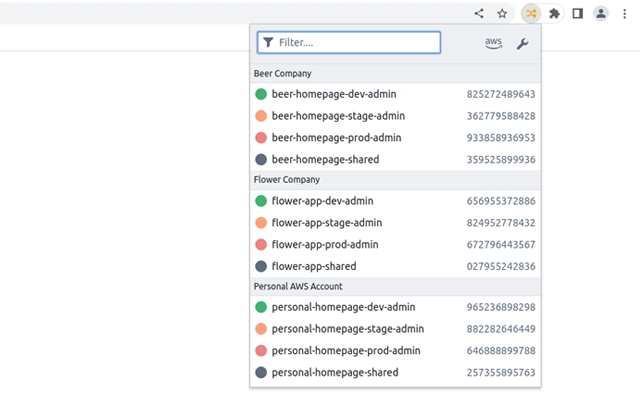
The user interface is minimal and focused, centered around a compact popup that appears upon triggering the shortcut. The layout displays a list of configured roles with clear visual indicators, supporting efficient scanning and selection. Navigation is intuitive, relying on standard keyboard inputs—arrow keys for movement and Enter to confirm selection—ensuring a low learning curve.
Workflow efficiency is enhanced by the direct integration with the browser and the absence of additional setup steps. Once installed and configured, the plugin operates seamlessly within the AWS console. The developer did not specify resource usage details, but based on its lightweight nature and browser-based execution, it is expected to have minimal impact on system performance. Stability is likely high, given its reliance on standard browser APIs and the use of modern JavaScript practices.
Performance observations are based on general software behavior patterns. The plugin does not require significant CPU or RAM allocation during normal operation. It is designed to load quickly and respond instantly to keyboard input, maintaining a responsive user experience even when managing hundreds of roles.
Compatibility & System Requirements
The plugin is compatible with Windows, Mac, and Linux operating systems, ensuring broad accessibility across development environments. It is designed to work with major desktop browsers, though specific browser versions were not listed. The installation size is 2.5 MB, indicating a lightweight footprint that does not impose significant storage demands.
Exact system requirements were not listed. The plugin relies on browser-based technologies, so compatibility is primarily dependent on the browser’s support for modern JavaScript, local storage, and sync features. It does not require administrative privileges or additional runtime dependencies.
Pros and Cons
Pros
- Fast, keyboard-driven role switching with minimal latency
- Supports up to 200 roles, far exceeding the AWS console’s default limit
- INI format configuration is familiar to AWS CLI users
- Syncs settings across devices via browser storage
- Auto-theming improves usability in different lighting conditions
- Free to use with no hidden costs or subscriptions
Cons
- No official documentation or tutorial provided
- Dependency on browser sync may limit cross-browser consistency
- Configuration editing requires manual code input
- No built-in validation for INI format syntax
- Not available as a standalone desktop application
FAQ Section
Is the plugin compatible with all major browsers?
The plugin is designed to work with browsers that support modern JavaScript and sync storage. Specific browser compatibility details were not provided by the developer.
Can I use this plugin offline?
Yes, the plugin functions without an internet connection once installed and configured. Role data is stored locally in the browser.
How are my role configurations secured?
Configurations are stored in the browser’s local storage and sync storage (if enabled). The developer did not provide details on encryption or data protection measures.
Does the plugin require a paid AWS account?
No, the plugin works with any AWS account that allows role switching through the console. It does not require a paid subscription or special permissions beyond standard IAM access.
Can I update the plugin automatically?
Automatic updates are handled by the browser’s extension marketplace. Users are notified when a new version is available and can update with a single click.
Final Thoughts
The AWS Role Switcher plugin offers a practical, efficient solution for developers managing multiple AWS roles. Its keyboard-first design, support for large role sets, and cross-device sync make it a valuable tool in complex cloud environments. While it lacks detailed documentation and built-in configuration validation, its simplicity and performance compensate for these shortcomings.
Developers who frequently switch between AWS accounts and environments will benefit most from this tool. It reduces friction in daily workflows and enhances productivity without introducing complexity. The free pricing model further increases its appeal.
Download AWS Role Switcher now
Guides & Tutorials for AWS Role Switch Extension for Chrome
How to install AWS Role Switch Extension for Chrome
- Click the Preview / Download button above.
- Once redirected, accept the terms and click Install.
- Wait for the AWS Role Switch Extension for Chrome download to finish on your device.
How to use AWS Role Switch Extension for Chrome
This software is primarily used for its core features described above. Open the app after installation to explore its capabilities.
User Reviews for AWS Role Switch Extension for Chrome 0
No reviews found





